
What’s a tag?
A tag, often referenced to as element as well, is how we write up our HTML. There are a lot of available tags with different meanings, let’s see the most generic one and how to use them.
Some generic tags
div
The most generic one, stands for division, super usefull to well, divide the page in different sections.
span
Pretty much like a div, except that it is an [inline element].
p
The content is supposed to be text, a paragraph to be specific.
img
As this tag reads, we’re going to display an image! Carefull, this is an inline-element.
Open/close a tag
1
<p>This "p" tag is now open, let's close it here: </p>
Some tags are autoclosing, let’s see how
1
<img href="./../images/my-pic.jpg" alt="cute cat with sunglasses" id="cool-cat" />
Nesting tags
HTML has child-parent relationships and sibling relationships aswell, let’s see it with an image:
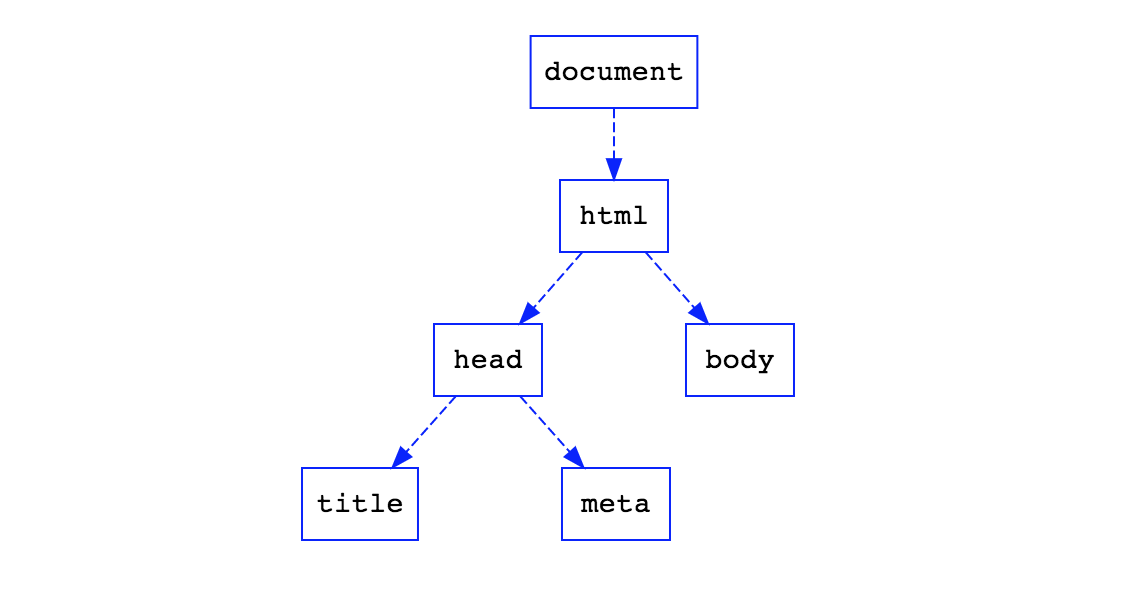
- The html tag is the parent of the head tag.
- The title tag is a child of the head tag.
- head and body are siblings.
This could be written like so in HTML:
1
2
3
4
5
6
7
8
9
10
11
<!DOCTYPE html>
<html>
  <head>
    <title>My title</title>
    <!-- Notice that meta tags are a bit weird and don't need to be closed. -->
    <meta charset="UTF-8">
  </head>
  <body>
    <!-- Some content will go here! -->
  </body>
</html>